Deutschlandticket for students
The Deutschlandticket for students is available to students at the University of Applied Sciences Jena. This will replace the previous semester ticket.
From the winter semester 2024/2025, the student ID card (thoska) will no longer have "Semesterticket" printed on it.
How do I get the Deutschlandticket?
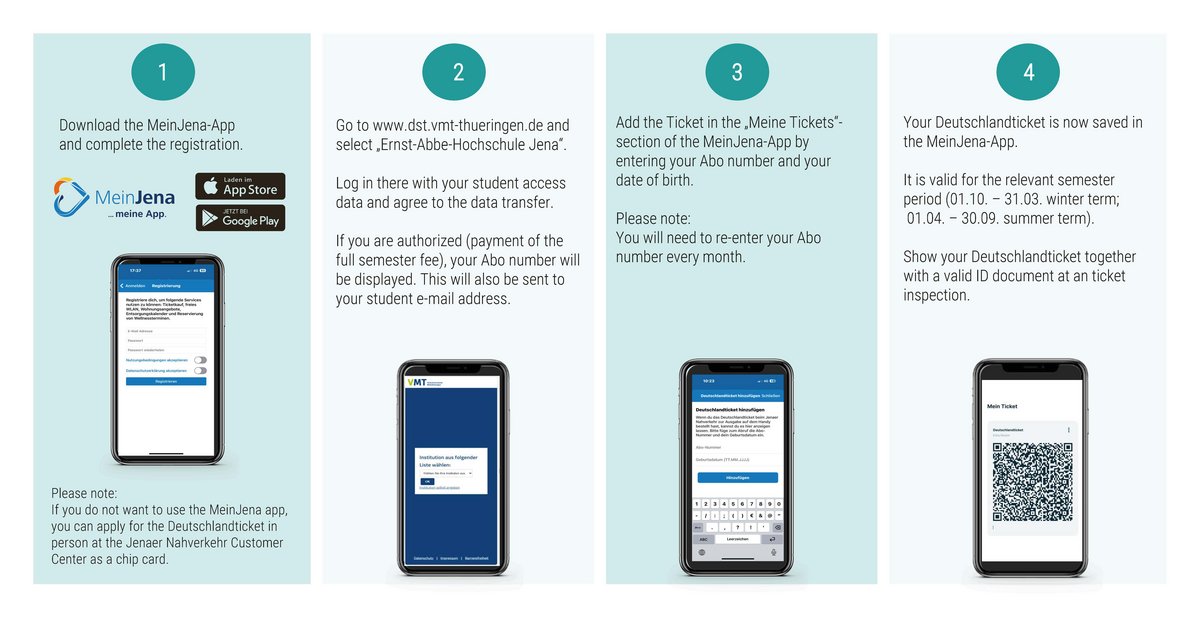
- Download the MeinJena app (Download iOS | Download Android), complete the registration process and then log in to the app.
- Go to www.dst.vmt-thueringen.de and select "Ernst Abbe Hochschule Jena" (problems may occur with mobile browsers. it is best to use a PC or laptop). Log in there with your student access data and agree to the data transfer. If you are authorised (payment of the full semester fee), your Abo number will be displayed. This will also be sent to your student e-mail address.
- Add the Deutschlandticket in the "Meine Tickets" section of the MeinJena app by entering your Abo number and your date of birth. You will need to re-enter your Abo number every month.
- Your Deutschlandticket is now saved in the app. It is valid for the respective semester period. Show your Deutschlandticket together with a valid ID document at a ticket inspection.
Updating the Deutschlandticket for the change of semester
Before the start of the following semester
If you retrieve the Deutschlandsemesterticket before the start of the following semester, your personal subscription number remains the same.
After the start of the following semester
If you retrieve the Deutschlandsemesterticket after the start of the following semester, a new subscription number will be assigned when you retrieve the ticket. In this case, set up the Deutschlandsemesterticket with your new subscription number as shown in the image above.
Troubleshooting in the MeinJena app
Errors may occur when activating the Deutschlandticket in the MeinJena app.
Please try the following procedure:
- Register in the MeinJena app
- Log in to the MeinJena app and enter your name, address and date of birth in the profile settings
- Log out and log in to the MeinJena app and then try again to import the ticket with the Abo number and date of birth
If it is still not possible to add the Deutschlandticket, please contact kontakt@meinjena.de or servicecenter@nahverkehr-jena.de