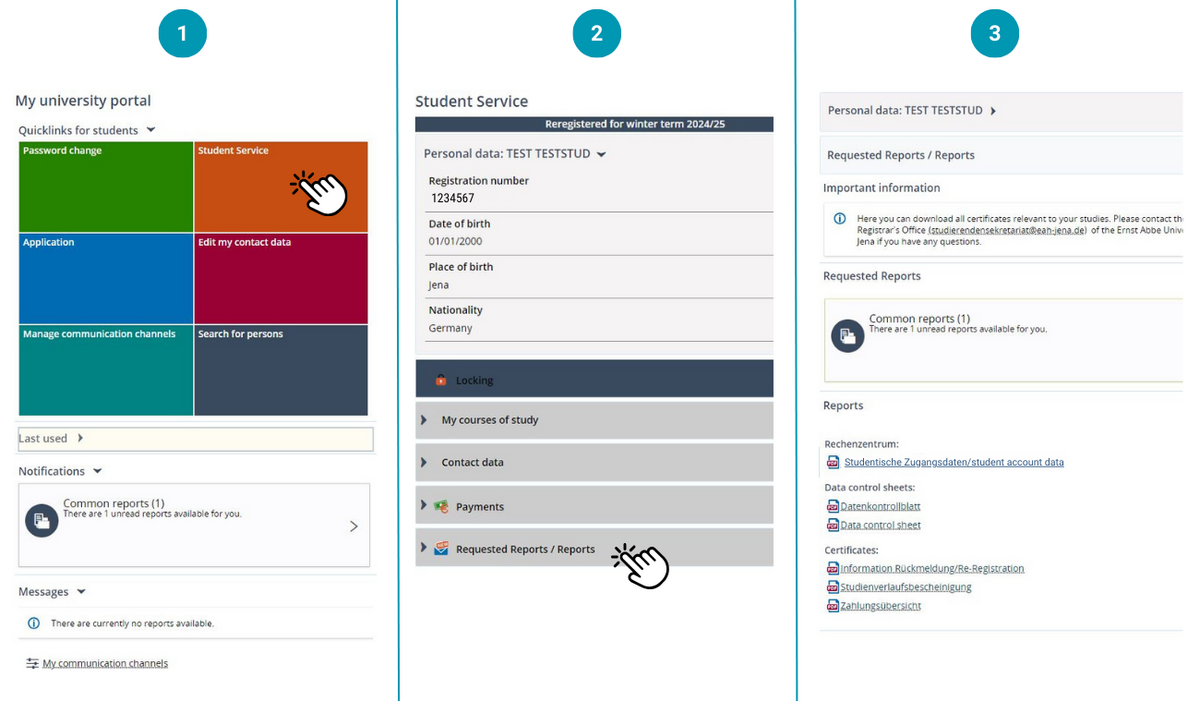
Where can I find my student account data?
After you enroll, you’ll receive new student login details for the online services of the university.
Where can I find my student account data?
Log in to the Campusportal using the login data you used for your application. Under the “Student Services” quick link, you’ll find your new login details in the document “Student Account Data” on the “requested reports/reports” tab.
How long can I use my previous login data?
Your applicant login data remain valid for 90 days after your enrollment. However, once you’ve obtained your student account data, you should only use those to log in.
What should I do with my new login credentials?
With your student account data, you can access the online services. For security reasons, change the initial password after logging in for the first time. Here’s how to change your password: Instructions for changing your password. Please note that the password you choose will not be displayed in the “Student Account Data” document afterward.
Can’t log in?
You can find further help on our “Problems with the Campusportal?” page.